
Creating Accounts and SSH Keys on the Target System (Push Accounts)
JumpServer can automatically create accounts and SSH keys on target systems with specified parameters.
Any actions performed on target systems—such as creating accounts or SSH keys, discovering accounts, changing passwords, or rotating SSH keys—are executed by JumpServer on behalf of a privileged account that is added to your asset. This account must be marked as "Privileged" in its account properties:
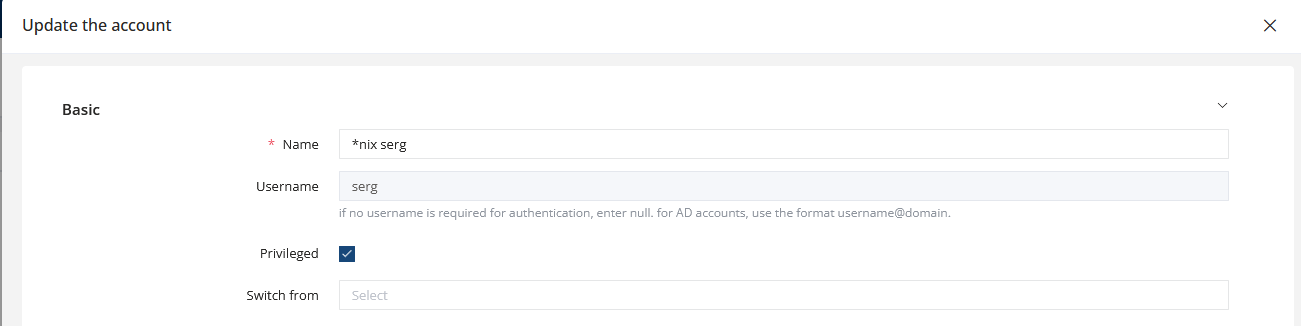
If your asset does not have at least one account marked as Privileged, JumpServer will not attempt to perform any tasks related to account management.
How Push Account Works
-
If the account does not exist on the target system and does not exist in the JumpServer account list, it will be created on the target system and added to JumpServer.
-
If the account exists on the target system and exists in the JumpServer account list, nothing will happen — even if the passwords do not match.
-
If the account exists on the target system but is not present in the JumpServer account list, the password on the target system will be changed (according to the password settings in the task), and the account will be added to JumpServer.
-
If the account does not exist on the target system but is present in the JumpServer account list, the account will be created on the target system using the same password that is configured in JumpServer.
Creating an Account or SSH Key
Assets
Select one or multiple assets where the accounts or SSH keys will be created.
Nodes
Select a folder containing assets. JumpServer will attempt to create accounts on all assets located in the selected folder(s).
Accounts
Enter the usernames that will be created on all selected assets.
Secret strategy
-
Specified Secret — manually set a new password
-
Random generate — automatically generate a password
Password rules
Define the parameters for password generation.
Push parameters
Available only for host-type assets. Additional parameters for creating accounts on Linux systems.
Periodic
Enable periodic execution of the account creation task.