
Discovering Unmanaged Accounts (Discover Accounts)
JumpServer can automatically detect unmanaged accounts on target systems — accounts that were not added to the list of known accounts in the JumpServer interface.
A discovered account can be automatically added to the list of managed accounts with an automatic password change, or it can be removed from the target system.
Why Is Account Discovery Necessary?
Unmanaged accounts pose a significant security risk and can be exploited by attackers.
An unmanaged account may:
-
have been created temporarily “for testing,” with a weak or default password;
-
have been created by a former employee or contractor, possibly without authorization;
-
have no clear ownership or usage history (and may not be used at all).
Configuring Account Discovery
Any actions on target systems (creating accounts or SSH keys, discovering accounts, changing passwords, or rotating SSH keys) are executed by JumpServer on behalf of a privileged account assigned to your asset. This account must be marked as “Privileged” in the account properties:
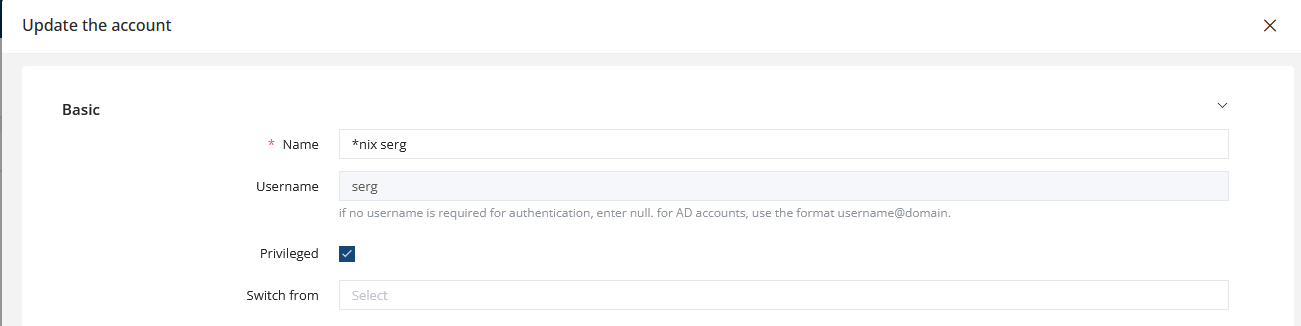
Additionally, in the platform settings, you must enable the Gather accounts enabled option (enabled by default):

Enabling Automatic Account Discovery
-
Go to PAM → Automation → Discover Accounts
-
Open the Account discovery tasks tab
-
Click Create
-
Fill in the required parameters:
Assets
Select one or several assets where account discovery will be performed.
Nodes
Select a folder containing assets. JumpServer will attempt to discover accounts on all assets inside the selected folder(s).
Sync to assets
- ENABLED: JumpServer will add the discovered account to the managed account list and perform a password change
- DISABLED: You will see the discovered accounts and manually choose whether to delete them from the target system or add them with a password change
Check risk
Discovered accounts will appear under PAM → Risk Detection marked as New found.
Periodic
Enable periodic execution of the account discovery task.
Click Submit to save the discovery task.
Running Account Discovery
To run a discovery task manually:
-
Go to PAM → Automation → Discover Accounts
-
Open the Account discovery tasks tab
-
Click Execute next to the desired discovery task
-
Wait for the process to complete
Discovered accounts will appear in
PAM → Automation → Discover Accounts → Discovered accounts:

Actions for Discovered Accounts
In the Status column, the following actions are available:
-
delete remote account — the account will be deleted from the target system
-
add account — add the account to the managed list without changing the password
-
add account after password changing — add the account with an automatic password change
-
ignore — ignore the discovered account